Account security: two-factor, withdrawal whitelist, API keys
Three settings. Under ten minutes for all of them. The unusual part is that the order you do them in matters more than any individual choice within them — get the sequence wrong and one of the protections spends its first three days locking you out instead of anyone else.
The order, and why it matters
Do these in this sequence: authenticator-based two-factor first, withdrawal whitelist second, API keys last — and by "last" I mostly mean "not at all".
The reason for that order is not aesthetic. The whitelist carries a cooling-off period whenever you enable it or add an address to it. That delay is the entire mechanism: an attacker who has your account cannot add their own address and empty it in the same session. But the delay applies to you just as strictly, so the moment to accept it is a quiet week when you have nothing to move. Turn it on the evening before a token unlock and you have built a cage around yourself rather than around anyone else.
Two-factor goes first because the whitelist settings themselves are protected by it. Setting up a lock before the door is hung achieves less than it appears to.
Authenticator app, then whitelist your own address, then leave the API section alone. Do it on a day when nothing is happening, because every one of these has a delay built into it and delays are only tolerable when you are not in a hurry.
Two-factor: not the SMS one
Three kinds are usually offered and they are not equivalent.
| Method | Real strength | How it fails |
|---|---|---|
| SMS code | Low | Number ported away, or SIM swapped at the carrier |
| Authenticator app | Good | Phone lost with no backup of the seed |
| Hardware security key | Strongest | Key lost, and no second key registered |
| Email code | Low | Only as strong as the mailbox behind it |
SMS is the one to move away from, and the reason is worth understanding rather than memorising. Your phone number is not really yours: it is assigned to you by a carrier, and a person who convinces that carrier's support desk that they are you can have it reassigned in an afternoon. Every code then arrives on their handset. This is not exotic; it is a routine technique, and it is why an SMS-protected account with a meaningful balance is a soft target.
An authenticator app produces its codes on the handset, offline, so there is no carrier in the loop to be persuaded of anything. When you enable it, save the backup codes or the setup key somewhere offline — on paper, in a drawer. That single step is the difference between a lost phone being an inconvenience and being a multi-day identity-verification ordeal.
A hardware key is better still and is worth the cost once the balance justifies it — keys built to the FIDO standard check the site's identity themselves, so a phishing page never receives anything it can reuse. If you go that way, register two and keep the second somewhere else. A single hardware key is a single point of failure wearing a security badge.
The withdrawal whitelist
With the list switched on, withdrawals can only go to destinations you added yourself beforehand. Somebody who takes over your account cannot simply paste in their own wallet and send; they have to add an address and then wait out the cooling-off period, which is a window in which you can notice, log in, and stop it.
Two practical points. First, enable it before your first deposit, so the waiting period runs down while you have nothing at stake. Second, add the addresses you actually use at the same time (your own hardware wallet, an exchange you regularly move to) so that when you eventually need to withdraw, the list already contains the destination.
What people get wrong is treating it as something to configure in a crisis. By the time there is a crisis, the delay is working against you. It is also worth saying plainly that a whitelist does nothing about somebody trading your balance into worthlessness or spending it inside the platform; it constrains the exit, not the account. It is one control among several, not a perimeter.
Label each whitelisted address with what it is and which network it belongs to. Six months later, "my wallet" and "my other wallet" will mean nothing to you, and a withdrawal sent on the wrong network is a separate category of loss that no security setting prevents.
API keys you never needed
An API key is a credential that lets software act on your account without logging in. If you are not running a bot or a portfolio tool that specifically requires one, you have no reason to create any.
If you do need one, three rules cover most of the danger. Never grant withdrawal permission: almost nothing legitimately needs it, and a key that can withdraw is a password that can withdraw. Restrict the key to specific IP addresses if the option is offered, which makes a stolen key useless from anywhere else. And write down what each key is for at the moment you create it, because a key labelled nothing, six months old, is a decision you can no longer evaluate.
Then go and look at your existing keys. Most people who have been on an exchange for a couple of years have one or two left over from a tool they stopped using, still live, still permissioned. Delete them. There is no cost to deleting a key you are not using and a real cost to leaving it there.
The account above the account
Everything above assumes the exchange account is the thing being defended. It sits on top of something else. Password resets, authenticator rebinding, most restriction removals — the flow goes through your email, which means whoever reads that mailbox outranks every setting on this page.
So the mailbox needs two things of its own. It needs two-factor enabled, for the same reasons and with the same preference order. And its recovery options — the backup number, the backup address — need to be things you still control. A surprising number of people have an exchange account guarded properly and a mailbox whose recovery number was disconnected years ago, which is a locked door with the wall removed beside it.
Three details go unnoticed. Don't use a work or university address: you leave, you graduate, the domain changes, and the address stops existing while still being the recovery route for a live account. Check the forwarding and filter rules occasionally, because the competent version of a mailbox compromise doesn't change the password and alert you — it quietly adds a rule that forwards anything matching a few keywords and marks it read, so your mail arrives normally minus the messages that matter. And read the sign-in activity page that every major provider offers, since an unfamiliar location shows up there before it shows up anywhere you'd notice on your own.
What I do is keep a separate mailbox used for exchanges and nothing else — no signups, no outgoing mail. It doesn't make the mailbox stronger; the account is exactly as strong as any other. What it changes is exposure: that address has never been typed into a form that later leaked, so it doesn't appear on the lists people work through. The cost is one more account to look after, which I think is cheap.
The anti-phishing code
This is the highest return for the least effort on the whole page, and the setting fewest people have turned on. Once set, every genuine email from the exchange carries a short string you chose yourself. Mail without it wasn't sent by them.
What makes it valuable is that it replaces a question you cannot answer with one you can. Phishing mail is now good: sender addresses can be forged, layout is copied wholesale, the logo is lifted, the footer disclaimer is word for word. "Does this look real?" has no reliable answer any more. "Does this carry my string?" has exactly one.
Three things when you set it. Don't choose something guessable — not a birthday, not the last digits of your number, not a handle you use elsewhere; a short run of meaningless characters is ideal, and you never have to remember it because it arrives in the mail itself. Don't treat it as a password: it appears in plain text in every message, by design, so it must not be a string you use anywhere else. And apply the same test to in-app notifications, not just email — a message claiming to be official without the string is one you don't click anything inside.
One limit worth stating plainly: the code proves an email is genuine. It says nothing about a website. Arrive at a convincing fake page through a search result, type your credentials in, and the code was never in the loop. That layer is bookmarks, and only bookmarks.
What changes during a launch
Launch periods change the risk picture in ways that have nothing to do with your settings and everything to do with your attention.
You are expecting messages. You are expecting links. You are in a hurry, watching a countdown, and reading quickly, which is the precise state in which a convincing fake page succeeds. The people running those pages know when the campaigns are, because the campaigns are announced publicly, and they schedule accordingly. The volume of impersonation attempts around an announcement is not an accident of timing.
Two habits carry most of the weight here. Arrive through your own bookmark or the app, never through a link handed to you, however plausible its source. And treat anyone who contacts you first as fake by default: support does not open conversations, and it does not do so on social platforms at all. The detail of how these operations work is set out in fake airdrops and fake support staff, and the short version is that you do not need to identify the fake if you never arrive at it.
A third habit, less obvious: during a launch, resist installing anything. New wallet, new browser extension, new "claim helper" — the answer is no. Whatever you needed should have been installed a week ago in a calm moment, which is the same argument as everything else on this page.
Three ways accounts actually go
Not theory. These three account for most of what we hear about.
- A password reused somewhere else. A shopping site leaks, the same email and password appear in a list, and somebody tries them against every exchange in turn. The exchange was never breached; the reuse was the whole vulnerability. A unique password per site, kept in a password manager, closes this entirely.
- A phishing page reached from a search result or a message. The address bar reads almost right. You type the password, then you type the two-factor code, and both are relayed to the real site in real time by the attacker. Note that two-factor did not save you: this is exactly the attack it does not stop, which is why arriving through your own bookmark matters even for people with good settings.
- The SIM swap. The number is ported, SMS codes go elsewhere, the password reset runs through them. Whoever is on the other end does not need to break anything technical.
Read down that list and one thing stands out: only the third is really about the account. The other two are about a password and about where you clicked. Security settings are necessary and they are not the main variable, which is a slightly deflating conclusion for an article full of settings — but it is the accurate one, and knowing it changes what you spend your caution on.
The first ten minutes
Order matters more than the individual actions. The instinct is to change the password first, and changing the password neither ejects a session already logged in nor stops a withdrawal already moving. Those are separate switches, and the first ten minutes are about finding them in the right sequence.
- Stop withdrawals. If the security settings offer a direct switch to disable them, use it. If not, delete every address in the whitelist. This is the tourniquet; everything else waits.
- End every session. Look for device management or login history and terminate all of them, including the one you are using.
- Change the password, and the mailbox password with it. Both, together. Doing one leaves the route back open.
- Re-enrol two-factor. If the authenticator might have been cloned, bind a fresh one and invalidate the old.
- Audit API keys. The quietest place to leave a back door and the easiest to forget. Anything you don't recognise, delete.
- Then contact support. One message: when it happened, what you saw, what you have already done. Not a drip of fragments across six replies.
The first two steps are a race measured in minutes; the rest are measured in hours. Getting the order wrong usually costs exactly what leaves during those minutes.
One counterintuitive point. Do not search for how to recover a hacked account. People who have just been hit are the prime market for the second round, and the "asset recovery" operations that surface in results and reply threads exist for that market specifically. Support has one entrance: the app you already use, or the bookmark you saved yourself.
Changing phone or number
The most common self-inflicted lockout is a new phone. The authenticator seed does not travel with your SIM, your phone number, or an ordinary cloud backup of your apps. Wipe the old handset before moving it and the codes are gone.
The sequence that works: with both phones in front of you, use the authenticator's own transfer or export function to move the entries, log in successfully on the new device to prove it works, and only then reset the old one. If your app has no transfer function, re-enrol two-factor on the exchange from scratch while you still have the working old device: disable, re-enable, scan the new code.
Changing phone number is a smaller job but worth doing deliberately: update it in the account while the old number still works, because the change is usually confirmed by a code sent to the old number. Do it after the number is disconnected and you are in the recovery process, which means identity checks and days rather than minutes.
If you are travelling and about to swap to a local SIM, do all of this before you leave. Recovering an exchange account from a hotel room in a country you have never logged in from is the hardest version of this problem, because the unfamiliar location triggers extra checks at the same time.
When nobody else can get in
By this point the aim of the whole page is clear: make the account reachable by you and by nobody else. The better that works, the sharper the side effect — if something happens to you, your family cannot reach it either.
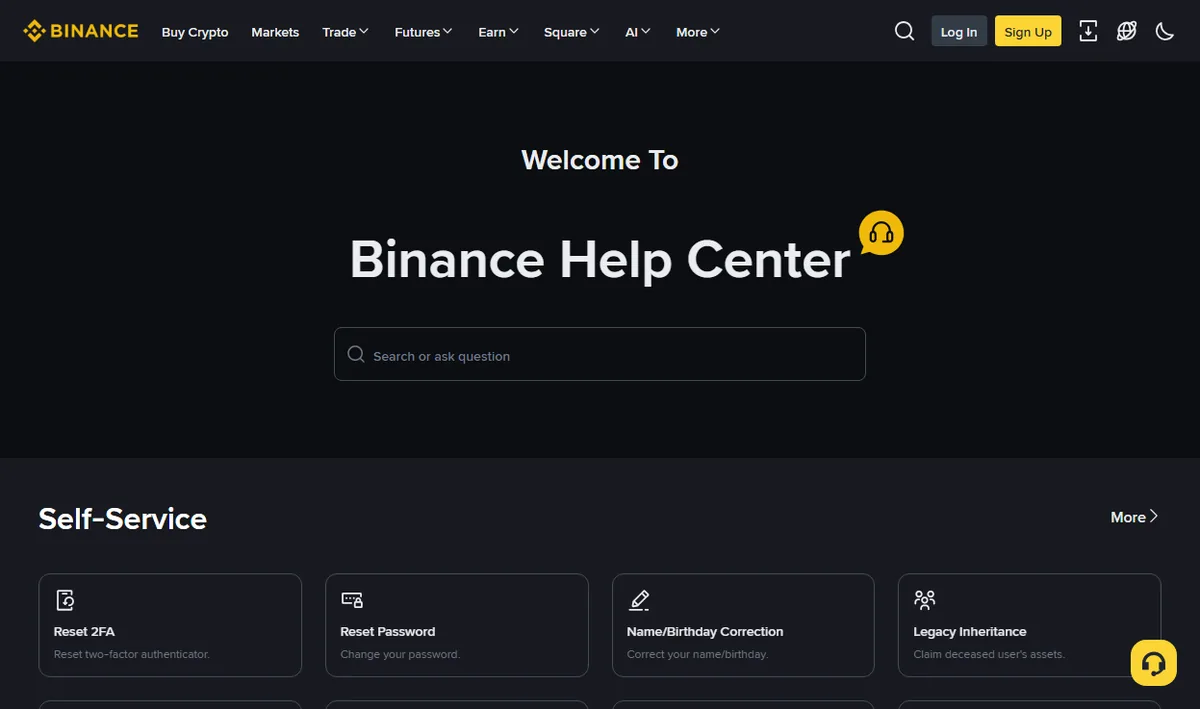
This isn't a morbid aside. Exchanges have a process for it; in the help-centre screenshot above, the last card in the self-service row is headed "estate inheritance". But that route runs on manual review and documents, and it has a prerequisite that is missing more often than any of the paperwork: somebody has to know the account exists.
What helps is light. Let at least one person know there is such a thing — not the password, not even the amount, just that an account exists and which platform holds it. Keep the recovery material together: the paper with the backup key on it, the mailbox recovery details, somewhere a person you trust would find them. And keep it out of a notes app that syncs everywhere, because what is convenient for you is convenient for anyone else who gets in. Those last two pull against each other and there is no arrangement that satisfies both; you are choosing which risk you prefer.
I'm aware this section is uncomfortable, and that most security write-ups leave it out. It belongs to the same category as the paper with the backup key: the kind of thing with no second chance, only on a longer timescale.
The occasional look round
Twice a year is enough, and it takes about five minutes.
- Active sessions and devices. Anything you cannot place, or stopped using, gets signed out.
- API keys. Delete whatever is no longer attached to a working tool.
- The whitelist. Remove addresses belonging to wallets you have retired.
- Recovery email and phone. Confirm both still reach you: an old work address here is a common quiet failure.
- Backup codes. Check they are where you think they are, and still legible.
Put it in a calendar twice a year and it stays a five-minute job forever. Skip it for three years and it becomes an afternoon of untangling, usually undertaken in the worst possible circumstances.
Setting names and the exact length of cooling-off periods differ by platform and change over time. Everything above describes common behaviour as of August 2026 and is not a substitute for what your own account's security page tells you.
Questions people ask
Is SMS two-factor good enough?
Better than nothing, worse than an authenticator app or a hardware key. The weakness is that the number is not really yours — it can be ported away by someone who convinces your carrier they are you, and once they hold the number the codes arrive on their phone.
Why does the withdrawal whitelist have a waiting period?
Because the delay is the protection. Someone who takes over the account still has to wait out the full period before a new address becomes usable, and that is time in which you can notice and intervene. A whitelist that took effect instantly would protect nobody.
I changed my phone and my authenticator codes are gone. What now?
Use the backup codes you saved when you enabled it. If you saved none, recovery through support is what remains, and it takes days and involves identity checks. Move the authenticator before wiping the old phone, not after.
Do I need an API key?
If nothing you run requires one, no. An unused key is an unattended door. Create keys only when something specific needs them, never enable withdrawal permission, and delete them when the thing that needed them is gone.